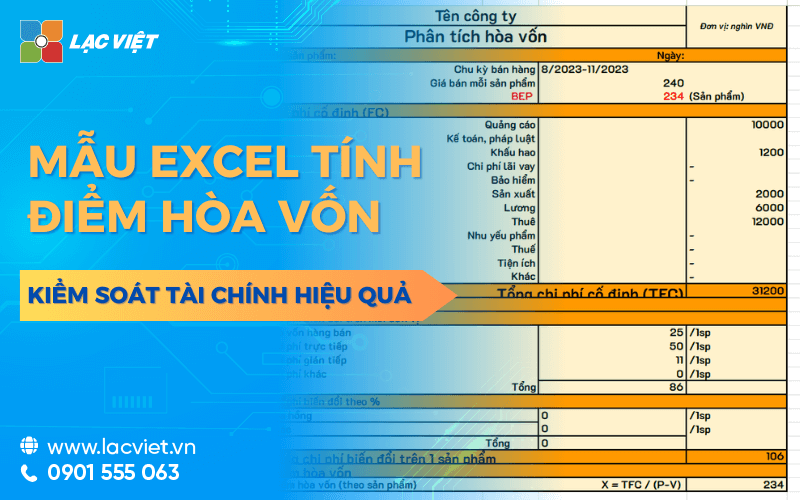

Mẫu Excel tính điểm hòa vốn là file bảng tính thiết kế sẵn giúp doanh nghiệp tự động tính toán sản lượng hoặc doanh thu cần thiết để đạt mức lợi nhuận bằng không. Bằng cách nhập các thông số như chi phí cố định, chi phí biến đổi và giá bán, công cụ này hỗ trợ nhà quản lý xác định ngưỡng an toàn tài chính, từ đó tối ưu hóa lợi nhuận và ra quyết định kinh doanh chính xác.
Trong môi trường kinh doanh hiện nay, mỗi quyết định tài chính đều cần được xây dựng dựa trên cơ sở dữ liệu rõ ràng. Một trong những chỉ số then chốt giúp doanh nghiệp định hướng hoạt động kiểm soát rủi ro là điểm hòa vốn. Việc nắm bắt điểm hòa vốn giúp nhà quản lý trả lời những câu hỏi cốt lõi như: “Doanh nghiệp cần bán bao nhiêu sản phẩm để không lỗ?”, “Tại mức giá nào thì kinh doanh bắt đầu có lời?”, hay “Chi phí cố định hiện tại có đang tạo áp lực tài chính quá lớn hay không?”
However, many businesses, especially small and medium enterprises still no conditions for investment in the system management software, financial depth. Therefore, use Excel template calculate the breakeven point become a versatile option, save workable. See more posts from Lac Viet to get the sample standard file below.
DOWNLOAD SAMPLE FILE CALCULATE THE BREAKEVEN POINT IN THIS
1. Excel template calculate the breakeven point is what?
Excel template calculate the breakeven point is a file workbook pre-designed to help businesses easy entry of input data automatically calculate the breakeven point as output or revenue needed to achieve the level of profitability of 0 (no hole, no interest). This tool is simple but incredibly effective to business self-assessment of the profitability of business operations.
Basic structure of an Excel template calculate the breakeven point:
Input information:
- Fixed costs are the sum does not change according to the number of sales as rent, staff salaries fixed, depreciation of equipment.
- Variable costs on each product as raw material, packaging costs, sales commissions.
- Price units: price level of business expected to sell out each and every product or service.
Formula:
- According to the output:
The breakeven point (output) = fixed Cost / (selling Price unit variable Costs unit)- According to revenue:
Điểm hòa vốn (doanh thu) = Chi phí cố định / Tỷ lệ số dư đảm phí
Outputs:
- Yield or revenue breakeven is automatically calculated and displayed clearly.
- Some models also integrate the visualization chart (the cost – revenue intersect at point).
2. Instructions how to use Excel template calculate the breakeven point
Excel template calculate the breakeven point is a simple tool, but very useful for enterprises to determine the threshold of financial security to the decision in accordance with business practice. To effectively use this template, business need to follow three main steps: enter the input parameters, understand the formula for calculating the analytical outputs.
2.1. Determined to enter the correct input parameters
The input parameters are the basis of all calculations in Excel template. So, the first step and most important is to correctly identify each item:
- Fixed costs (Fixed Costs): This is the expenditures do not depend on production or sales, such as rent, salary administration, asset depreciation. For example: Business luxury office with a 30 million/month, cost management is 20 million/year → fixed Costs = 50 million.
- Variable costs per unit of product (Variable Cost per Unit): Is the extra cost when the business sold a product, including raw materials, shipping, sales commissions... For example: If each product needed 70,000 coins raw materials and 10,000 shipping, variable cost = 80,000 vnd/product.
- The selling price of products or services (Selling Price per Unit): Is the price the business expects to sell one unit of product/service on the market. Need to ensure this price was calculated based on the survey of needs, competitiveness. For example: selling Price of a product is 150,000.
After you complete input the data into the Excel template, the recipe will automatically return the result.
2.2. Interpret formula is integrated in the file
Excel template usually include two ways of calculating the breakeven point in terms of output and by revenue. Businesses can choose the method appropriate to the specific operation.
- Formula for calculating the breakeven point in terms of output:
Output breakeven = fixed Costs / (selling Price – variable Costs)
Ví dụ: Giả sử chi phí cố định là 100 triệu đồng/tháng (khác ví dụ ở mục 2.1), giá bán 150.000, chi phí biến đổi 80.000
→ Output breakeven = 100.000.000 / (150.000 – 80.000) = 1.429 products.
- Formula for calculating the breakeven point in revenues:
Doanh thu hòa vốn = Chi phí cố định / Tỷ lệ số dư đảm phí
Tỷ lệ số dư đảm phí = (Giá bán – Chi phí biến đổi) / Giá bán
→ Rate = (150.000 – 80.000)/150.000 = 0,4667 → revenue breakeven = 100 million / 0,4667 = ~214 million.
- Analysis of the breakeven point theo kịch bản (Best – Base – Worst):
Business can create more 3 workbook with different situations:
The optimistic scenario (Best case): a high selling Price, low cost → point low.
Scenario average (Base case): current Data.
The pessimistic scenario (Worst case): increased Costs, price decline → point higher.
The construction of this script helps business is not as volatile market.
2.3. Cách lập công thức điểm hòa vốn trong Excel
Ví dụ minh họa: nhập chi phí cố định vào ô B1 (50.000.000), giá bán đơn vị vào ô B2 (150.000), chi phí biến đổi đơn vị vào ô B3 (80.000), sau đó lập công thức ở các ô kết quả:
- Sản lượng hòa vốn (ô B4): =ROUNDUP(B1/(B2-B3),0). Kết quả 715 sản phẩm, vì 50.000.000 / 70.000 = 714,3 và sản lượng phải làm tròn lên mới đủ bù chi phí.
- Tỷ lệ số dư đảm phí (ô B5): =(B2-B3)/B2. Kết quả khoảng 46,67%.
- Doanh thu hòa vốn (ô B6): =B1/B5. Kết quả khoảng 107,1 triệu đồng.
- Lợi nhuận tại sản lượng dự kiến nhập ở ô B7: =B7*(B2-B3)-B1.
Nếu muốn biết cần bán bao nhiêu để đạt một mức lợi nhuận mục tiêu, doanh nghiệp dùng tính năng Goal Seek (Data > What-If Analysis > Goal Seek): chọn ô lợi nhuận làm ô đích, nhập lợi nhuận mong muốn và chọn ô B7 là ô thay đổi. Excel sẽ tự tìm sản lượng tương ứng. Nếu máy dùng định dạng vùng Việt Nam, thay dấu phẩy trong công thức bằng dấu chấm phẩy. Sau khi lập xong, nên khóa các ô công thức bằng Review > Protect Sheet để tránh người dùng vô tình nhập đè.
2.4. Tính điểm hòa vốn cho nhiều sản phẩm
Khi doanh nghiệp bán nhiều sản phẩm có biên đóng góp khác nhau, không thể cộng sản lượng các sản phẩm với nhau. Cách làm phổ biến là tính tỷ lệ số dư đảm phí bình quân theo cơ cấu doanh thu dự kiến:
Doanh thu hòa vốn chung = Chi phí cố định chung / Tỷ lệ số dư đảm phí bình quân, trong đó tỷ lệ bình quân = tổng của (tỷ trọng doanh thu từng sản phẩm x tỷ lệ số dư đảm phí của sản phẩm đó).
Ví dụ minh họa với chi phí cố định chung 50 triệu đồng/tháng:
| Indicators | Sản phẩm A | Sản phẩm B |
|---|---|---|
| Giá bán / biến phí đơn vị | 150.000 / 80.000 đồng | 200.000 / 150.000 đồng |
| Tỷ lệ số dư đảm phí | 46,67% | 25% |
| Tỷ trọng doanh thu dự kiến | 60% | 40% |
| Doanh thu hòa vốn từng sản phẩm | khoảng 78,9 triệu đồng (khoảng 527 sản phẩm) | khoảng 52,6 triệu đồng (khoảng 264 sản phẩm) |
Tỷ lệ số dư đảm phí bình quân = 60% x 46,67% + 40% x 25% = 38%, nên doanh thu hòa vốn chung = 50 triệu / 38% = khoảng 131,6 triệu đồng. Kết quả chỉ đúng khi cơ cấu doanh thu thực tế giữ đúng tỷ trọng dự kiến; nếu tỷ trọng thay đổi, doanh nghiệp cần cập nhật lại ô tỷ trọng trong file Excel.
2.5. Đọc phân tích kết quả hiển thị
After template Excel automatic calculation, businesses need to interpret the results to make decisions in business:
How to read the results: display results normally include:
- Minimum output need to sell to breakeven.
- The minimum revenue needed to achieve
- Profit at the revenue level difference (if any side table). This is the base to determine the business goals minimum.
Suggestions planning from data:
- If the production of breakeven is 1,500 products/month → Delivery KPI for sales department at a high level more than 1,500 products.
- If the revenue breakeven is 300 million → budgeting, marketing, production revolves around revenue milestones this.
How to use chart: some models have line chart or column display:
- The revenue and the total cost intersect at point → easy to visualize when presented with leadership.
- Can create more chart emphasizes profit/loss at the output level, various help make decisions to expand or reduce.
3. Pros nhước of Excel template calculate the breakeven point
3.1. Pros: solutions start effective flexible for every business
- Free easy to reach: One of the reasons why Excel become a popular choice is because high availability. Most businesses have installed Microsoft Excel, or you can use the same tools, the online for free such as Google Sheets. The use does not require investment in new software, at no additional cost.
- Dễ sử dụng dễ tùy chỉnh theo ngành nghề: Khác với phần mềm tài chính chuyên sâu vốn đòi hỏi đào tạo, mẫu Excel cho phép người dùng linh hoạt thay đổi công thức, cấu trúc bảng theo đúng đặc thù ngành nghề.
- Not dependent on specialized technologies: Excel does not need network connection, does not depend on the host system. Therefore, business can be used anytime, anywhere, even when working offline.
- Help raise awareness for financial management: through the data entry and tracking, live results, the managers didn't even specialize in finance can better understand about fixed costs, variable costs, break-even point.
3.2. Limit: Warning before the business depends too much on Excel
- Not update the data dynamically: Excel works entirely handmade. Every time want to calculate the breakeven point, the user need to re-enter the entire revenue data, the cost of that work is repeated, loss of time, easy to miss if you forget to update.
- Easy to errors if you enter an incorrect formula or data: Just a wrong sign in the formula or enter the wrong data, the entire calculation results can be deflected serious. In fact, many small businesses't wrong decisions just because... a cell, Excel is the error that no one finds out.
- Lack of ability to connect with the parts related: Excel is just a tool independent, not linked to system sales, accounting, or inventory management. This makes business takes more time to synthesize data from multiple sources reduces the efficiency increased risk of false information.
- Does not support analysis, forecast or take risk warning: while many software modern finance has integrated features, forecasts, analysis scenario or warning when revenues decreased the level, then Excel is almost no likelihood that business is active before market movements.
4. Suggestion for improvement template Excel combined with financial software professional
Use Excel template to calculate the breakeven point is a good first step, especially for the small and medium business. However, when scale business expansion, financial data, increasingly need to update continuously, then the use of Excel craft began to reveal many restrictions. To solve this, businesses should consider switching from Excel template independent to a software solution, smart financial instruments as Financial AI Agent of Vietnam.
Lac Viet Financial AI Agent to solve the “anxieties” of the business
For the accounting department:
- Reduce workload and handle end report states such as summarizing, tax settlement, budgeting.
- Automatically generate reports, cash flow, debt collection, financial statements, details in short time.
For leaders:
- Provide financial picture comprehensive, real-time, to help a decision quickly.
- Support troubleshooting instant on the financial indicators, providing forecast financial strategy without waiting from the related department.
- Warning of financial risks, suggesting solutions to optimize resources.
Financial AI Agent of Lac Viet is not only a tool of financial analysis that is also a smart assistant, help businesses understand management “health” finance in a comprehensive manner. With the possibility of automation, in-depth analysis, update real-time, this is the ideal solution to the Vietnam business process optimization, financial management, strengthen competitive advantage in the market.
SIGN UP CONSULTATION AND DEMO
Reasons to switch:
- Tự động hóa toàn bộ quy trình tính toán cập nhật dữ liệu: Khác với Excel phải nhập số liệu thủ công, phần mềm như Financial AI Agent có thể kết nối trực tiếp với ERP accounting software, hệ thống bán hàng hoặc dữ liệu kho. Nhờ đó, thông tin về doanh thu, chi phí cố định và chi phí biến đổi luôn được cập nhật tự động chính xác theo thời gian thực. Doanh nghiệp không cần mất thời gian tổng hợp thủ công hay lo sai lệch dữ liệu.
- Analysis of the breakeven point in real time: Financial AI Agent not only calculate the breakeven point in a fixed way, but also continually re-calculate when there are fluctuations in price, cost or product quality. This helps business decisions faster, especially when need to change the business strategy unscheduled (reduce price, increase promotion, adjust costs...).
- Smart alert when revenue neckline the hole: Another prominent feature is the possibility of early warning. When actual revenue fell almost to the point of breakeven, the system will automatically send alerts to the administrator timely interventions: regulate the production, boost sales, cut costs, etc. This is something that Excel file completely and can't do.
In summary, if Excel template is a stepping stone to help businesses reach financial concepts basically, Financial AI Agent is what is metabolism important to help businesses digitize comprehensive governance finance.
Experience demo right financial solutions smart at: https://lacviet.vn/lac-viet-financial-ai-agent
Trong bối cảnh cạnh tranh ngày càng gay gắt, việc hiểu rõ điểm hòa vốn không còn là kỹ năng của riêng bộ phận tài chính mà là một công cụ ra quyết định chiến lược cho toàn bộ doanh nghiệp. Mẫu Excel tính điểm hòa vốn chính là bước khởi đầu đơn giản nhưng hiệu quả giúp nhà quản lý có được góc nhìn rõ ràng về chi phí, doanh thu và mức an toàn kinh doanh tối thiểu.
However, as businesses grow, data growing exponentially and the speed of decision making need to be quick, Excel, gradually becoming limited. This is when business should switch from computational thinking craft to the financial management initiative, the auto-correct in real time.