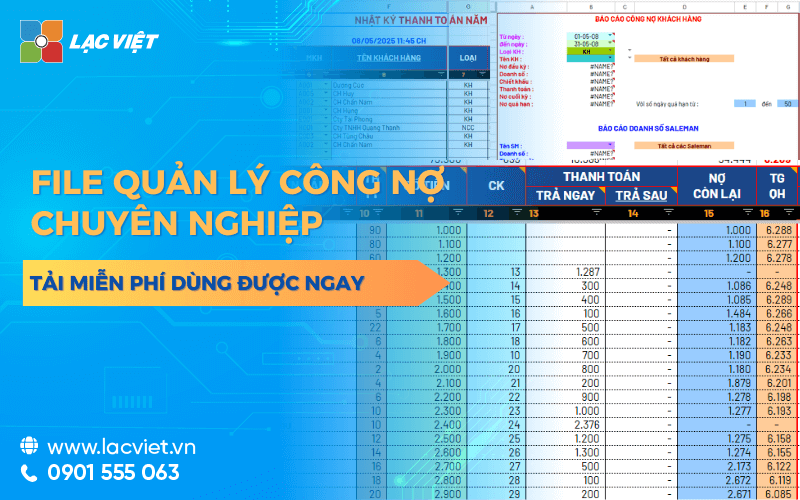

File debt management by Excel is a tool to help businesses take notes, track details, accounts receivable from customers and pay to the supplier an intuitive way. The file structure usually consists of include the column core data such as date of birth, amount, term, payment, balance, and state debt to control your money flow efficiently. The application of automatic formula (SUMIF, IF, VLOOKUP) the same Conditional Formatting to help businesses quickly synthesize data, identify overdue debts.
Solution use the file manager of public debt in Excel is many small businesses choose as a method, just simple easy to use back at no cost initial investment. With an Excel file pre-designed in the correct logic business, the business can quickly track status of public debt according to each customer or supplier easily filter search for reference when need.
This article Lac Viet will help you:
- Understand the Excel file to manage public debt free is what used to do.
- Understand how to use effective, the limitations of this tool.
- Tải ngay mẫu file Excel miễn phí kèm hướng dẫn cách tạo trên excel chi tiết.
CLICK ĐỂ TẢI FILE EXCEL QUẢN LÝ & THEO DÕI CÔNG NỢ MIỄN PHÍ
1. Tải mẫu file quản lý công nợ bằng Excel theo dõi công nợ khách hàng, đối tác miễn phí chuyên nghiệp
| Tên mẫu | Mô tả nhanh | Link tải miễn phí |
|---|---|---|
| Mẫu công nợ phải thu khách hàng |
|
Tải miễn phí |
| Mẫu công nợ phải trả theo mặt hàng |
|
Tải miễn phí |
| Mẫu sổ tổng hợp công nợ |
|
Tải miễn phí |
| Mẫu công nợ phải trả theo tuổi nợ |
|
Tải miễn phí |
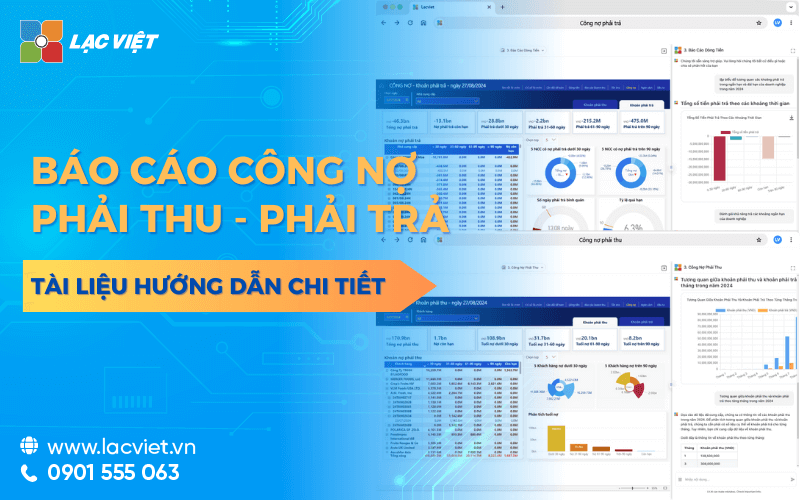
| Báo cáo tổng hợp công nợ phải trả |
|
Tải miễn phí |
| Mẫu danh mục khách hàng/nhà cung cấp |
|
Tải miễn phí |
1.1. Mẫu công nợ phải thu khách hàng
Mẫu công nợ phải thu khách hàng giúp doanh nghiệp theo dõi chi tiết các khoản tiền khách hàng còn nợ, phát sinh tăng giảm công nợ trong kỳ, số dư cuối kỳ theo từng đối tượng khách hàng. Đây là báo cáo quan trọng hỗ trợ bộ phận kế toán kiểm soát dòng tiền, đôn đốc thu hồi công nợ và đánh giá hiệu quả bán hàng.
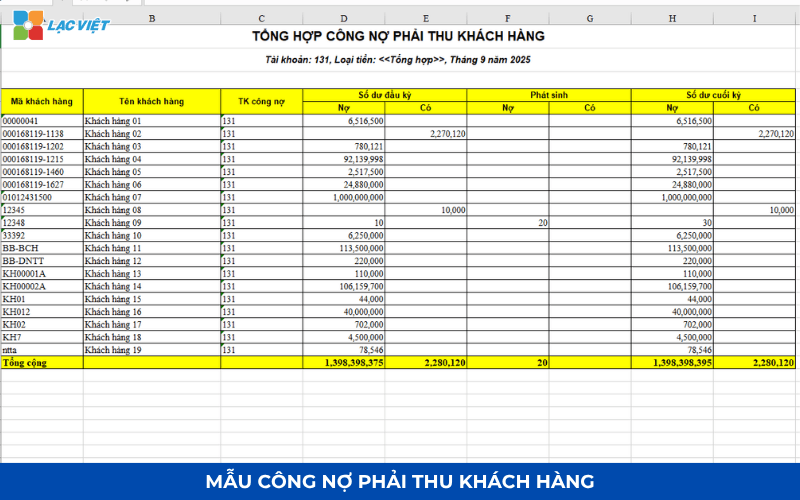
Thông tin quản lý chính:
- Mã khách hàng, tên khách hàng
- Tài khoản công nợ (TK 131)
- Số dư đầu kỳ
- Phát sinh tăng công nợ
- Phát sinh giảm công nợ
- Số dư công nợ cuối kỳ
- Tổng hợp công nợ phải thu toàn doanh nghiệp
Benefits:
- Kiểm soát công nợ khách hàng theo thời gian thực.
- Hạn chế nợ quá hạn và nợ khó đòi.
- Hỗ trợ đối chiếu công nợ nhanh chóng.
- Cung cấp dữ liệu phục vụ dự báo dòng tiền.
1.2. Mẫu công nợ phải trả theo mặt hàng
Mẫu công nợ phải trả theo mặt hàng giúp doanh nghiệp quản lý chi tiết các khoản phải thanh toán cho nhà cung cấp gắn với từng loại hàng hóa, nguyên vật liệu hoặc dịch vụ đã mua. Báo cáo cho phép truy xuất đầy đủ lịch sử giao dịch, số lượng, giá trị công nợ phát sinh theo từng mặt hàng.
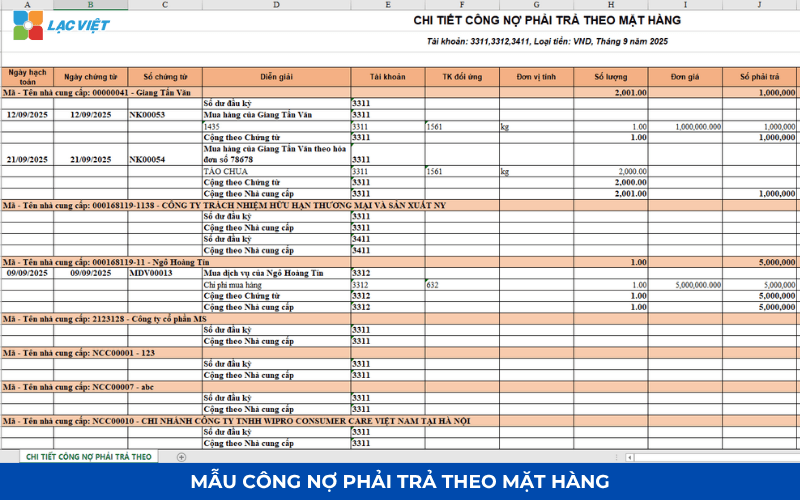
Thông tin quản lý chính:
- Ngày hạch toán, ngày chứng từ
- Số chứng từ
- Diễn giải nghiệp vụ
- Suppliers
- Mã hàng hóa, vật tư
- Number
- Unit price
- Thành tiền
- Công nợ phát sinh theo từng mặt hàng
Benefits:
- Theo dõi chính xác công nợ theo từng loại hàng hóa.
- Kiểm soát chi phí mua hàng hiệu quả.
- Hỗ trợ đối chiếu hóa đơn với nhà cung cấp.
- Phân tích giá trị tồn đọng công nợ theo nhóm vật tư.
1.3. Mẫu sổ tổng hợp công nợ
Sổ tổng hợp công nợ là biểu mẫu tổng hợp toàn bộ tình hình công nợ phải thu, phải trả của doanh nghiệp theo từng đối tượng, tài khoản kế toán. Báo cáo cung cấp bức tranh tổng thể về nghĩa vụ thanh toán và các khoản cần thu trong kỳ.
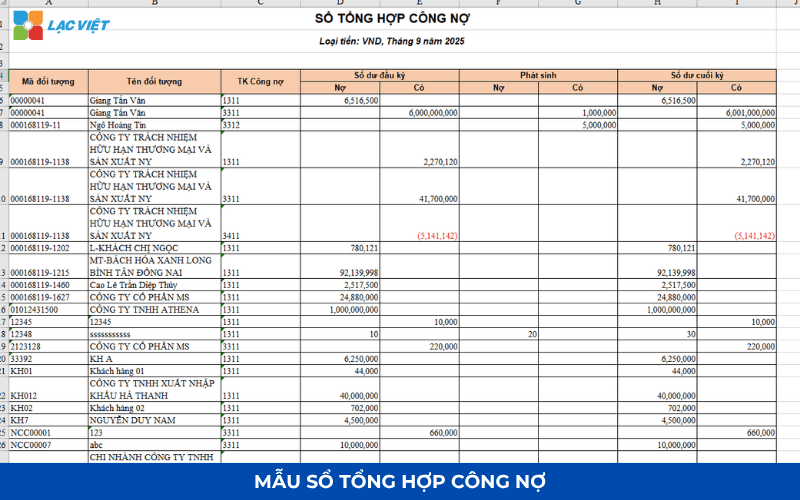
Thông tin quản lý chính:
- Mã đối tượng
- The name of the customer/supplier
- Tài khoản công nợ
- Số dư đầu kỳ
- Phát sinh Nợ/Có trong kỳ
- Số dư cuối kỳ
- Loại tiền theo dõi
- Tổng hợp theo từng tài khoản
Benefits:
- Đối chiếu số liệu công nợ nhanh chóng.
- Hỗ trợ lập báo cáo tài chính định kỳ.
- Kiểm soát công nợ tổng thể trên toàn doanh nghiệp.
- Giảm sai sót khi tổng hợp dữ liệu từ nhiều nguồn.
1.4. Mẫu công nợ phải trả theo tuổi nợ
Mẫu công nợ phải trả theo tuổi nợ giúp doanh nghiệp phân loại các khoản phải trả nhà cung cấp theo thời gian tồn đọng. Đây là công cụ quan trọng trong quản trị dòng tiền, giúp doanh nghiệp ưu tiên kế hoạch thanh toán, duy trì uy tín với đối tác.
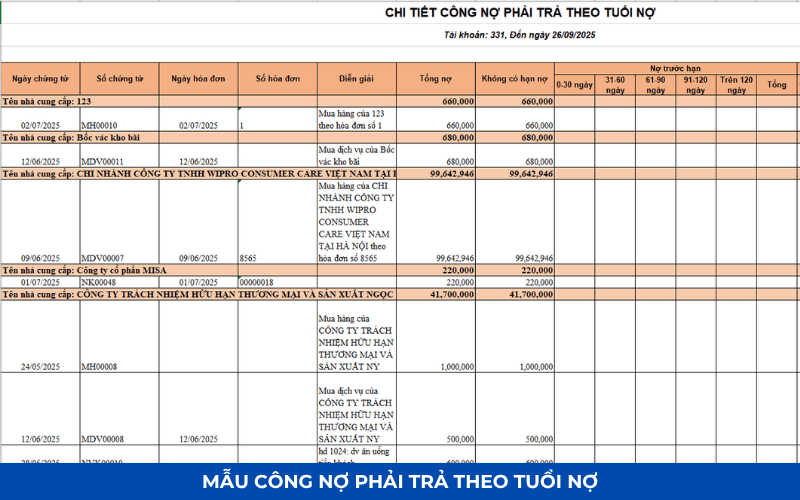
Thông tin quản lý chính:
- Tên nhà cung cấp
- Ngày chứng từ
- Ngày hóa đơn
- Invoice number
- Giá trị công nợ
- Nợ chưa đến hạn
- Nợ quá hạn 0–30 ngày
- Nợ quá hạn 31–60 ngày
- Nợ quá hạn 61–90 ngày
- Nợ quá hạn trên 90 ngày
Benefits:
- Theo dõi các khoản nợ sắp đến hạn thanh toán.
- Hạn chế phát sinh chi phí phạt trả chậm.
- Chủ động lập kế hoạch dòng tiền.
- Đánh giá tình trạng công nợ với từng nhà cung cấp.
1.5. Báo cáo tổng hợp công nợ phải trả
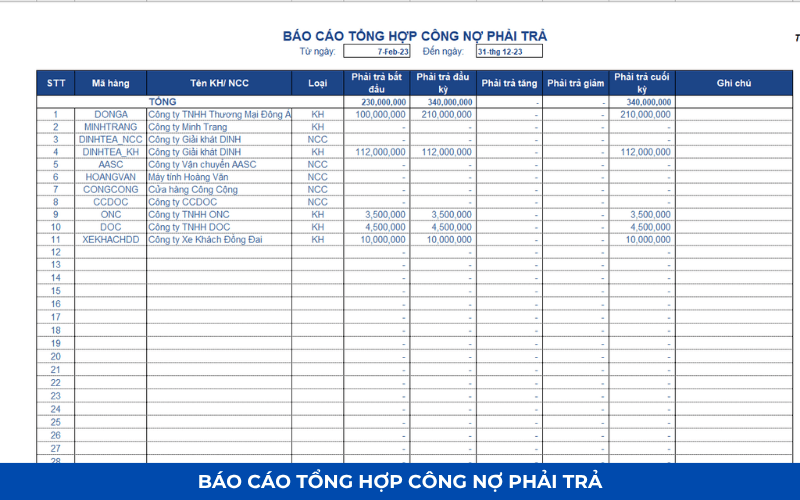
Báo cáo tổng hợp công nợ phải trả cung cấp thông tin tổng quan về các khoản nợ phải thanh toán cho nhà cung cấp trong kỳ. Doanh nghiệp có thể theo dõi biến động công nợ theo từng đối tượng, từ đó xây dựng kế hoạch chi trả hợp lý.
Thông tin quản lý chính:
- Mã nhà cung cấp
- Tên nhà cung cấp
- Loại đối tượng
- Phải trả đầu kỳ
- Phát sinh tăng
- Phát sinh giảm
- Phải trả cuối kỳ
- Notes
Benefits:
- Quản lý tập trung công nợ nhà cung cấp.
- Hỗ trợ lập kế hoạch thanh toán chính xác.
- Nâng cao khả năng kiểm soát chi phí mua hàng.
- Cung cấp dữ liệu phục vụ kiểm toán và báo cáo tài chính.
1.6. Mẫu danh mục khách hàng/nhà cung cấp
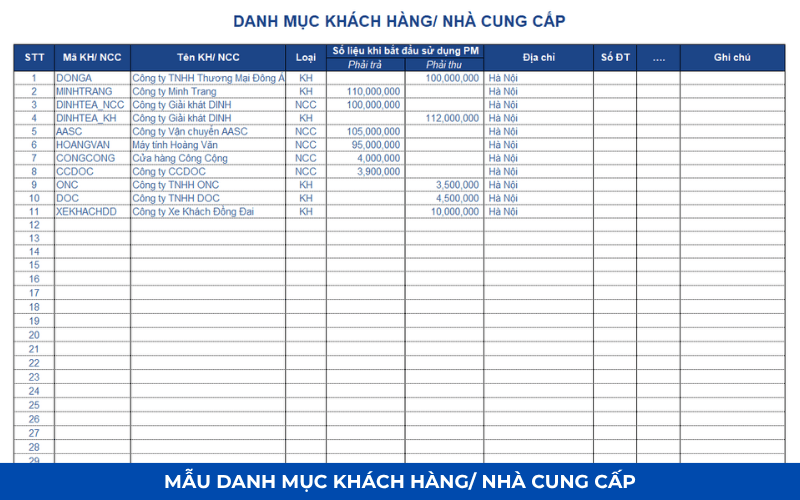
Mẫu danh mục khách hàng/nhà cung cấp là cơ sở dữ liệu lưu trữ toàn bộ thông tin đối tác giao dịch của doanh nghiệp. Biểu mẫu giúp chuẩn hóa dữ liệu, hỗ trợ quản lý công nợ, mua hàng, bán hàng, chăm sóc khách hàng hiệu quả.
Thông tin quản lý chính:
- Mã khách hàng/nhà cung cấp
- Tên đơn vị
- Loại đối tượng (KH/NCC)
- Address
- Mã số thuế
- Số điện thoại
- Người liên hệ
- Số dư công nợ đầu kỳ
- Notes
- Xây dựng cơ sở dữ liệu khách hàng và nhà cung cấp tập trung.
- Hỗ trợ tra cứu thông tin nhanh chóng.
- Kết nối dữ liệu với hệ thống kế toán, bán hàng.
- Nâng cao hiệu quả quản lý công nợ và giao dịch đối tác
[Tải mẫu bảng Excel quản lý công nợ miễn phí tại: [Link Google Drive]
2. File quản lý công nợ là gì?
File management public debt by free Excel is a spreadsheet designed to help business record, monitor management, the funds receivable from customers and pay to the supplier. Instead of having to set up the table follow the new debt from the start or tracking paper, discrete, this file helps to aggregate financial information in an intuitive way, with a clear structure, easy to use.
Typically, an Excel file manage debt effectively will include the data columns as:
- The name of the customer/supplier
- The date of the transaction
- Amount receivable or payable
- Payment due date
- Amount paid
- Remaining balance
- State public debt (valid/expired/'ve collected enough)
- Related notes
Distinguish between the following customer debt and public debt provider
- Table aggregate public debt customers: Record the revenue that has arisen but has not collected the money. The Excel File will help you to track each customer owes how much, from day paid how much owed how much.
- Panel track debts and suppliers: Reflects the amounts of goods and services that the business had bought but not yet paid. Keeping track of the debt providers help businesses proactively plan payment due date to avoid penalty or loss of reputation.
Who should use Excel file public debt?
- Small and medium enterprises: Not enough budget to invest ERP accounting software depth or number of transactions is not too big.
- Accounting office new establishment: Need to set up system, the debt quickly and without learning complex software.
- Personal or business owner: Want to control the account credit transactions with customers, a neat way to save.
3. Structure the content of a file Excel debt management efficiency
An Excel file manage public debt only really be effective when designed, systematic, logical, clear, easy updates. Here are the core components required in a table aggregate public debt Excel along with how to effectively use for each purpose management.
3.1. The columns of basic data are needed
- STT: order transaction to be easy to track.
- Date of birth: Date recorded business buy – sell.
- Object name: Customer or supplier related to liabilities.
- Interpretation transactions: brief description (example: sales, advance, collect money).
- Amount receivable/payable: specifies the amount of each transaction.
- Payment due date: bases determines The overdue debts.
- Amount paid: Update when there arises income – expenses.
- Remaining balance: auto calculated by the formula = Number of receivable – paid.
- Status: “in arrears”, “'ve collected enough”, “overdue”,... depending on the happenings.
- Notes: The additional information as to payment methods, contact us.
3.2. Guide to the classification group: receivables – payables
To easily control the flow of money should be split Excel file into 2 separate table, or use the filter (filter) for the “Type of public debt”:
- The debt to income: From customers, dealers, buyers.
- Public debt to pay: With suppliers, who sell, service, hire, outdoor,...
How this helps accounting easily plan debt collection and reasonable payment.
3.3. Tip use recipe format to increase effective
- Use the function IF statement to determine the status of public debt:
=IF(H2=0, The “paid”, IF(TODAY()>F2, “overdue”, “Longer-term”)) - Use Conditional Formatting to color red the overdue debts.
- Using SUMIF to calculate the total public debt of each customer.
- Use VLOOKUP to auto call customer name or code bill.
4. Hướng dẫn cách tạo file quản lý công nợ bằng Excel
Bạn có thể xây dựng một file quản lý công nợ trên Excel theo cấu trúc gồm 5 sheet để dễ nhập liệu, tra cứu và lập báo cáo.
| Sheet | Purpose | Main content |
| Danh mục khách hàng/NCC | Lưu thông tin đối tượng | Mã khách hàng, tên, MST, địa chỉ, người liên hệ, số điện thoại, email |
| Phát sinh công nợ | Nhập toàn bộ giao dịch | Ngày chứng từ, số chứng từ, khách hàng/NCC, diễn giải, phát sinh nợ, phát sinh có |
| Receivables | Track debts and customers | Số dư đầu kỳ, phát sinh, đã thu, còn phải thu |
| Accounts payable | Theo dõi công nợ nhà cung cấp | Số dư đầu kỳ, phát sinh, đã thanh toán, còn phải trả |
| Dashboard/Báo cáo | Tổng hợp số liệu | Tổng công nợ, công nợ quá hạn, biểu đồ, tuổi nợ |
Bước 1. Tạo danh mục khách hàng/nhà cung cấp
Đây là dữ liệu dùng chung cho toàn bộ file.
| Mã KH/NCC | Tên đơn vị | MST | Address | Người liên hệ | Điện thoại | |
| KH001 | Công ty ABC | … | … | Nguyen Van A | … | … |
| NCC001 | Công ty XYZ | … | … | Trần Văn B | … | … |
Nên đặt Data Validation để khi nhập giao dịch chỉ cần chọn mã khách hàng thay vì nhập thủ công.
Bước 2. Tạo bảng nhập phát sinh công nợ
Đây là sheet quan trọng nhất.
| Date | Số CT | Khách hàng/NCC | Interpretation | Phát sinh Nợ | Phát sinh Có |
| 01/07 | HD001 | KH001 | Sales | 15.000.000 | |
| 05/07 | PT001 | KH001 | Khách thanh toán | 10.000.000 | |
| 06/07 | PN001 | NCC001 | Nhập hàng | 8.000.000 | |
| 10/07 | PC001 | NCC001 | Thanh toán NCC | 5.000.000 |
In which:
- Phát sinh Nợ: Khoản phải thu hoặc phát sinh mua hàng.
- Phát sinh Có: Khoản khách hàng thanh toán hoặc doanh nghiệp thanh toán cho nhà cung cấp.
Bước 3. Tính số dư công nợ
Có thể sử dụng hàm SUMIFS.
Ví dụ tính tổng phát sinh của khách hàng:
=SUMIFS(E:E,C:C,A2)
Trong đó
- E:E: Cột phát sinh Nợ
- C:C: Mã khách hàng
- A2: Mã khách hàng cần tính
Tổng thanh toán:
=SUMIFS(F:F,C:C,A2)
Số dư công nợ:
=Số dư đầu kỳ + Tổng phát sinh – Tổng thanh toán
Bước 4. Theo dõi tuổi nợ
Thêm cột:
| Ngày đến hạn | Số ngày quá hạn | Nhóm tuổi nợ |
| 01/06 | 20 | 0–30 ngày |
| 15/05 | 50 | 31–60 ngày |
| 01/03 | 120 | Trên 90 ngày |
Công thức tính số ngày quá hạn:
=TODAY()-Ngày_đến_hạn
Phân nhóm tuổi nợ:
=IF(A2<=30,”0-30 ngày”,
IF(A2<=60,”31-60 ngày”,
IF(A2<=90,”61-90 ngày”,
“>90 ngày”)))
Nhờ đó doanh nghiệp dễ dàng theo dõi các khoản công nợ sắp đến hạn hoặc đã quá hạn.
Bước 5. Tạo báo cáo tổng hợp
Có thể sử dụng PivotTable để tổng hợp:
- Công nợ theo khách hàng
- Công nợ theo nhà cung cấp
- Công nợ theo tháng
- Công nợ theo nhân viên kinh doanh
- Công nợ theo khu vực
- Công nợ theo tuổi nợ
Ngoài PivotTable, nên bổ sung các biểu đồ cột hoặc biểu đồ tròn để trực quan hóa tỷ trọng công nợ.
Những hàm Excel nên sử dụng
| Hàm | Uses |
| SUMIFS | Tổng hợp công nợ theo điều kiện |
| IF | Phân loại trạng thái công nợ |
| XLOOKUP hoặc VLOOKUP | Lấy thông tin khách hàng từ danh mục |
| INDEX + MATCH | Tra cứu dữ liệu linh hoạt |
| TODAY | Tính số ngày quá hạn |
| COUNTIFS | Đếm số khoản công nợ theo điều kiện |
| SUBTOTAL | Tổng hợp dữ liệu sau khi lọc |
5. Ưu điểm và hạn chế của file quản lý công nợ bằng Excel
Using Excel file to manage public debt is popular choice of many small and medium enterprises, especially in the early stages, when investment costs for the software are limited. However, like any tool other Excel file has both strengths and weaknesses. Understanding these things will help business decision making should continue to use or switch to solution more professional.
5.1. Ưu điểm của file quản lý công nợ bằng Excel
- Free, easy to approach: Excel is familiar tools available in most of the office suite that businesses are using. The use of Excel file almost no additional costs are in accordance with the unit has a limited budget or just getting started organizations accounting system.
- Custom flexible according to the characteristics each enterprise: Not the same as accounting software have fixed structure, Excel allows users to create tables according to own needs. You can add the column data, apply color alerts, create formulas calculated in accordance with the pattern of their activities.
- No Internet connection required: Excel File works completely offline, does not depend on the system, network or server connection. This is a plus point for the business to operate in areas where network infrastructure is not stable, or the accounting needs data handling flexibility when moving.
- User-friendly common: No need to learn new software, no need to convert complex data, Excel is the tool that most office workers all know to use. The data entry, lookup, filter the information in the spreadsheet relatively intuitive easy to access.
5.2. Hạn chế khi dùng file Excel để theo dõi công nợ
- Easy to confuse, edit the wrong recipe: Just once entered the wrong data or mistakenly deleted the formula, the entire board public debt can be amiss that the user is not discovered immediately. Especially with the file complex, the check out the entire recipe is laborious easy to miss errors.
- No automatic alerts when a payment is due: Excel is calculation tools, static, there is no function to remind term or overdue alerts automatically. This makes business easy to miss the receivables or payables lead to bad debt or penalty for delayed payment.
- Difficult to expand as business grows: When the number of customers, suppliers and transactions increased significantly, the Excel file will become heavy, difficult to handle and no longer effective. The collate, aggregate data takes lot of time while there is no report function to support leadership decisions quickly.
- Lack of security access control: Excel is file singly, often shared via email or stored in the general folder. If not set security technical file can be edited or accessed by someone not authorized. Added to that, the lack of features that power make it difficult to control who is viewing, edit or delete data.
6. Vì sao các doanh nghiệp vẫn dùng mẫu file Excel để quản lý công nợ?
In the business environment competitive today, many businesses are gradually moving to use the specialized software to manage finance and accounting. However, in fact, the Excel file is still the popular choice with the small and medium enterprises especially in keeping track of the debt. So what makes Excel still be trusted?
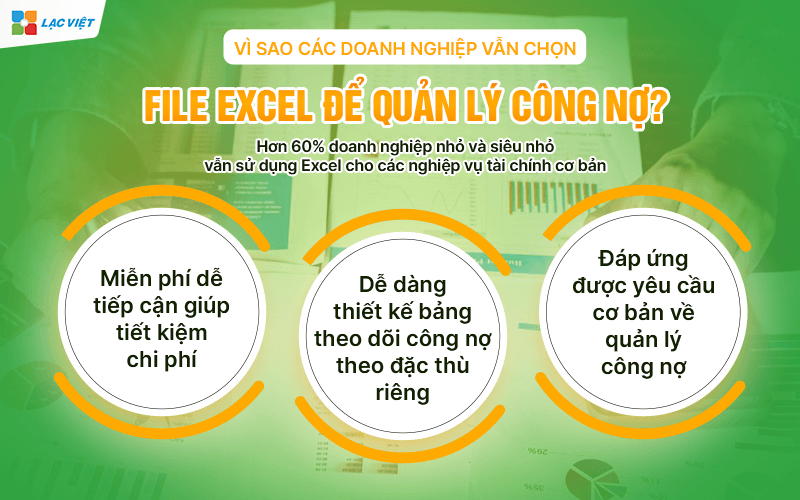
- Miễn phí dễ tiếp cận: Không phải doanh nghiệp nào cũng có điều kiện đầu tư phần mềm kế toán chuyên sâu ngay từ đầu. Đối với các doanh nghiệp nhỏ, công ty khởi nghiệp hoặc hộ kinh doanh, việc sử dụng mẫu file Excel miễn phí để quản lý công nợ giúp tiết kiệm chi phí đáng kể. Excel là công cụ có sẵn trên hầu hết máy tính văn phòng, không cần cài đặt phần mềm bổ sung, không yêu cầu đào tạo phức tạp.
- High flexibility: Với Excel, doanh nghiệp có thể dễ dàng thiết kế bảng theo dõi công nợ theo đặc thù riêng. Từ việc thêm/xóa cột, điều chỉnh định dạng, đến áp dụng các công thức tính toán phù hợp với từng loại giao dịch – mọi thứ đều tùy chỉnh được.
- Đáp ứng được yêu cầu cơ bản về quản lý công nợ: Với các hàm cơ bản như SUM, IF, VLOOKUP, CONDITIONAL FORMATTING, Excel hoàn toàn đủ khả năng hỗ trợ doanh nghiệp quản lý các khoản phải thu, phải trả trong phạm vi vừa phải. Ngoài ra, tính năng lọc, sắp xếp định dạng có điều kiện giúp người dùng dễ dàng nhận diện các khoản công nợ đến hạn, quá hạn hay đã thu/đã trả.
- Thống kê: Theo khảo sát của SME Vietnam 2024, hơn 60% doanh nghiệp nhỏ và siêu nhỏ vẫn sử dụng Excel cho các nghiệp vụ tài chính cơ bản như lập báo cáo thu chi, theo dõi hóa đơn, công nợ…
- Phù hợp với các doanh nghiệp có quy mô nhỏ ít giao dịch công nợ: Nếu doanh nghiệp chỉ phát sinh vài chục giao dịch mỗi tháng và không có đội ngũ kế toán chuyên trách thì một file Excel được thiết kế đúng chuẩn là hoàn toàn đủ để đáp ứng nhu cầu quản lý công nợ ngắn hạn.
Case match:
- Businesses with fewer than 50 regular customers.
- There is no demand for financial statements in more depth.
- Management wants to hold public debt directly, without passing through the complex system.
7. Khi nào doanh nghiệp nên chuyển sang phần mềm chuyên nghiệp?
The use of Excel in the management of public debt is consistent with the small business, less the transaction and accounting process simple. However, when expanding business scale, the amount of data arising increasingly, Excel begins to reveal serious limitations. Here are the warning signs that you should consider switching to a software debt management professional.
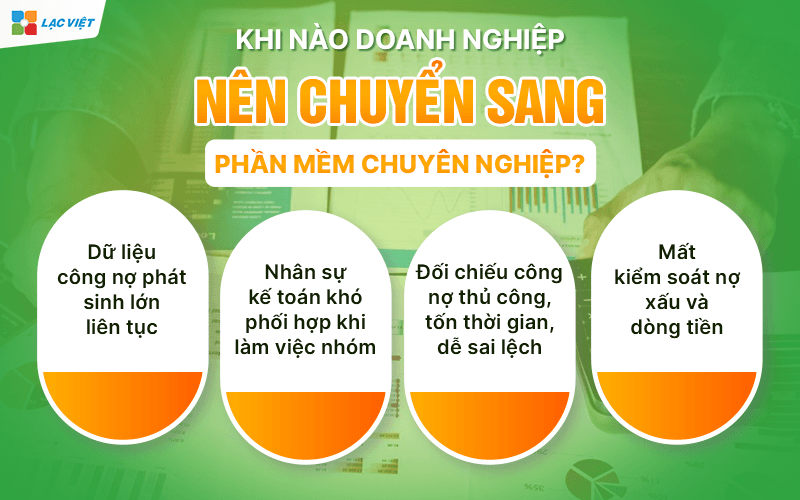
- Data public debt incurred large continuous: When a business has hundreds of customers or suppliers, arising thousands of transactions per month, Excel will no longer enough to meet. The spreadsheet becomes cumbersome, prone to slow, error formula difficult to control.
- Accounting personnel difficulty with coordination working group: Excel is not designed to work simultaneously on multiple computers, or for multiple users to access. This makes the assignment of coordination between the personnel meet many obstacles, easy-to-happen overwrite data or conflict file.
- Collate public debt craft, time consuming, easy to deviations: Excel accounting requirements filter, calculate, categorize, collate liabilities. When is an error or duplicate data, the process for screening becomes complex potential risks if not detected in time.
- Take control bad debt and cash flow: When the enterprise does not have tracking tool, payment term, liabilities are prone to overlook or slow processing. This directly affects the cash flow and liquidity. Many businesses fall into the status of “sales have interest but lack of cash” just because the debt is not recovered on time.
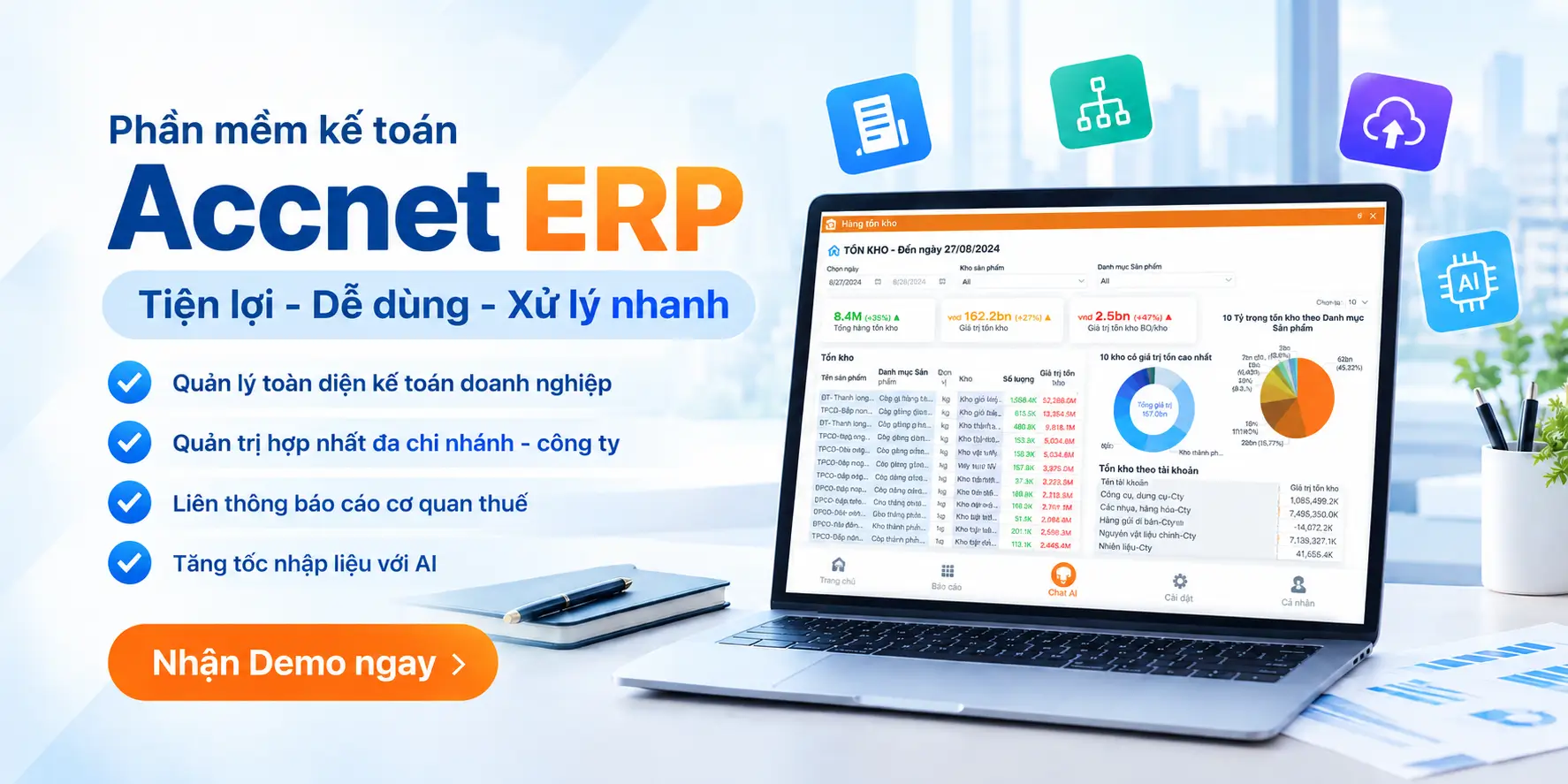
8. Quản lý công nợ dễ dàng với phần mềm kế toán AccNet ERP
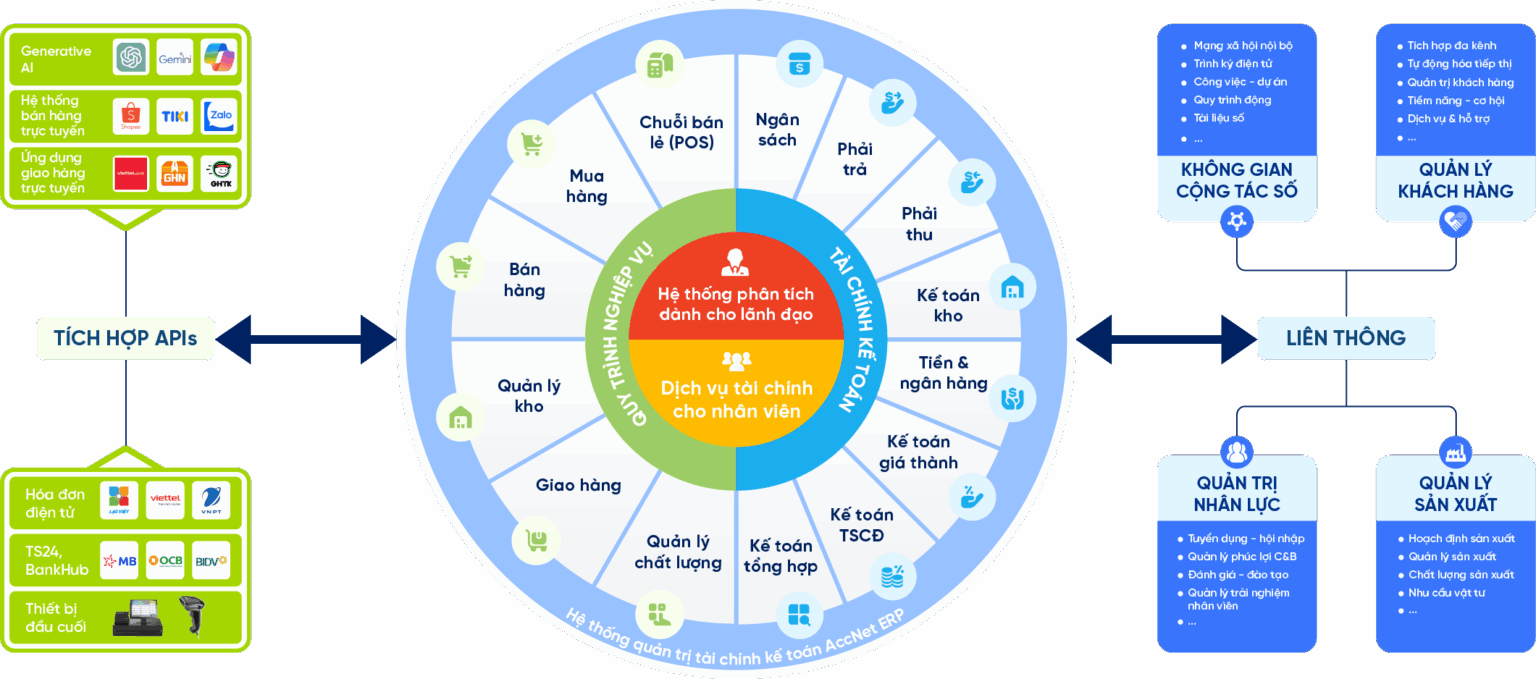
Công nợ phải thu và phải trả là một trong những yếu tố ảnh hưởng trực tiếp đến dòng tiền, khả năng thanh toán và hiệu quả hoạt động của doanh nghiệp. Tuy nhiên, việc quản lý công nợ bằng Excel thường gặp nhiều hạn chế như dữ liệu phân tán, khó đối chiếu, dễ phát sinh sai sót và mất nhiều thời gian tổng hợp báo cáo.
- AccNet ERP cung cấp giải pháp quản lý công nợ toàn diện, giúp doanh nghiệp theo dõi chi tiết công nợ khách hàng, nhà cung cấp theo từng đối tượng, hợp đồng, hóa đơn hoặc mặt hàng. Hệ thống tự động cập nhật số dư công nợ theo thời gian thực, hỗ trợ đối chiếu nhanh chóng và cảnh báo các khoản nợ đến hạn hoặc quá hạn thanh toán.
- Bên cạnh đó, AccNet ERP cung cấp đa dạng báo cáo quản trị như sổ tổng hợp công nợ, báo cáo công nợ theo tuổi nợ, báo cáo công nợ phải thu, phải trả và nhiều biểu mẫu phân tích chuyên sâu khác. Nhờ đó, nhà quản lý có thể kiểm soát chặt chẽ dòng tiền, giảm thiểu rủi ro nợ xấu và đưa ra quyết định tài chính chính xác hơn.
- Từ doanh nghiệp thương mại, sản xuất đến dịch vụ, AccNet ERP giúp chuẩn hóa quy trình quản lý công nợ, nâng cao hiệu quả vận hành và tối ưu nguồn lực kế toán tài chính.
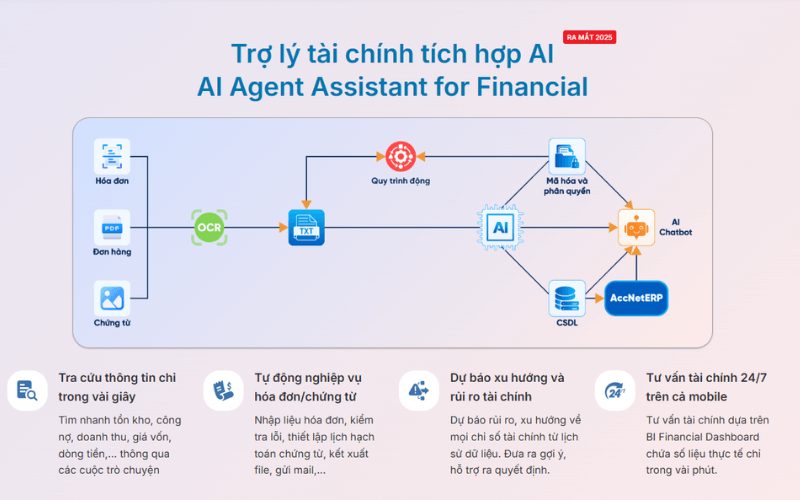
INTEGRATED AI ACCELERATION CONVERTER OF ACCOUNTING
AI in AccNet ERP't just stop at automate data entry, but also:
- Identification & classification certificate from smart: AI scan, read & sort invoice, voucher, receipt, limit errors due to input manually.
- Financial forecasting & budget: the system uses algorithms machine learning to forecast cost, revenue, business support decision fast.
- Warning risk accounting: AI to detect abnormalities in the book, from which timely warning of false or fraud risks.
- Reports assistant smart: AI suggested report template, automatic data aggregation support, leadership, financial analysis instant.
BUSINESS IS WHAT WHEN IMPLEMENTING ACCOUNTING SOFTWARE LAC VIET?
- Experience more than 30 years develop software solutions business management in Vietnam.
- Ecosystem of comprehensive: AccNet ERP easily connect with other solutions of Lac Viet (HRM, Workflow, Portal...).
- Advanced technology: Integrated AI support, cloud & on-premise flexible.
- Services dedicated support: A team of knowledgeable professionals with accounting – finance in Vietnam, companion throughout the deployment.
- Trust from thousands of customers in many areas: finance, banking, manufacturing, trade, services.
File debt management in Excel free is a useful tool, accessible, especially suitable for the small and medium enterprises are in the initialization phase the accounting system. When was reasonable design use the right way, the Excel file can fully support the business track debts and clear, save time, control the flow of money at a basic level.
Tuy nhiên, cũng cần nhìn nhận rằng Excel không phải là giải pháp lâu dài nếu doanh nghiệp có định hướng mở rộng quy mô, tăng trưởng doanh thu và cần sự minh bạch chính xác trong vận hành tài chính. Việc chuyển sang các giải pháp quản lý công nợ chuyên sâu như AccNet ERP của Lạc Việt sẽ mang lại những lợi thế rõ rệt về tự động hóa, cảnh báo rủi ro hỗ trợ ra quyết định tài chính chiến lược.