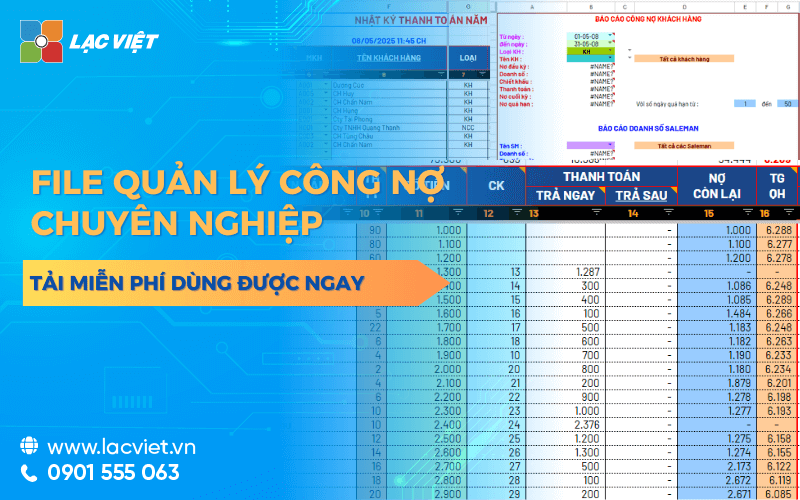

File Excel debt management is a tool to help businesses take notes, track details, accounts receivable from customers and pay to the supplier an intuitive way. The file structure usually consists of include the column core data such as date of birth, amount, term, payment, balance, and state debt to control your money flow efficiently. The application of automatic formula (SUMIF, IF, VLOOKUP) the same Conditional Formatting to help businesses quickly synthesize data, identify overdue debts.
Solution use the file manager of public debt in Excel is many small businesses choose as a method, just simple easy to use back at no cost initial investment. With an Excel file pre-designed in the correct logic business, the business can quickly track status of public debt according to each customer or supplier easily filter search for reference when need.
This article Lac Viet will help you:
- Understand the Excel file to manage public debt free is what used to do.
- Understand how to use effective, the limitations of this tool.
- Now download sample Excel file for free and access the advanced solutions if you need to expand the scale.
1. File management public debt in excel, what is free?
File management public debt by free Excel is a spreadsheet designed to help business record, monitor management, the funds receivable from customers and pay to the supplier. Instead of having to set up the table follow the new debt from the start or tracking paper, discrete, this file helps to aggregate financial information in an intuitive way, with a clear structure, easy to use.
Typically, an Excel file manage debt effectively will include the data columns as:
- The name of the customer/supplier
- The date of the transaction
- Amount receivable or payable
- Payment due date
- Amount paid
- Remaining balance
- State public debt (valid/expired/'ve collected enough)
- Related notes
Distinguish between the following customer debt and public debt provider
- Table aggregate public debt customers: Record the revenue that has arisen but has not collected the money. The Excel File will help you to track each customer owes how much, from day paid how much owed how much.
- Panel track debts and suppliers: Reflects the amounts of goods and services that the business had bought but not yet paid. Keeping track of the debt providers help businesses proactively plan payment due date to avoid penalty or loss of reputation.
Who should use Excel file public debt?
- Small and medium enterprises: Not enough budget to invest ERP accounting software depth or number of transactions is not too big.
- Accounting office new establishment: Need to set up system, the debt quickly and without learning complex software.
- Personal or business owner: Want to control the account credit transactions with customers, a neat way to save.
2. Why businesses still choose file Excel to manage your debt?
In the business environment competitive today, many businesses are gradually moving to use the specialized software to manage finance and accounting. However, in fact, the Excel file is still the popular choice with the small and medium enterprises especially in keeping track of the debt. So what makes Excel still be trusted?
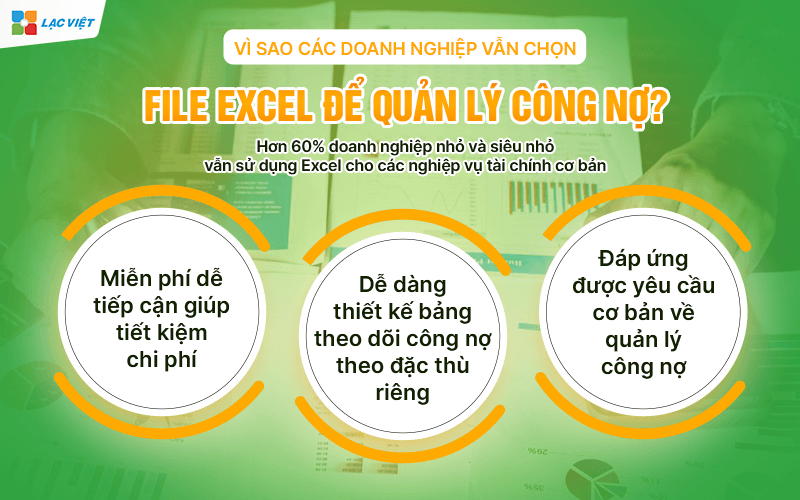
Free easy to access: is Not that well enterprises conditions, investment accounting software, in-depth right from the start. For the small business startup company or big business, the use of the Excel file, free to manage public debt help save significant costs. Excel tool is available on most office computer no need to install additional software, do not require complex training.
High flexibility: With Excel, business can easily design panel track public debt according to the own characteristics. From the add/remove columns, adjust the format, to apply the formula calculated in accordance with each type of transaction – everything is custom made.
Meet the basic requirements of managing public debt: With the basic functions such as SUM, IF, VLOOKUP, CONDITIONAL FORMATTING, Excel entirely afford support, business management, accounts receivable, payable in the range just right. In addition, the feature filter, sort, conditional formatting to help users easily identify the liabilities coming due, overdue or already collected/paid.
Statistics: According to the survey of SME Vietnam 2024, more than 60% of small businesses and small still use Excel for financial services such as reporting on income and expenditure, track bills, debts and...
In accordance with the business on a small scale transactions less public debt: If business arises only a few dozen transactions per month and not have a team of accounting experts blame an Excel file is designed standards is completely sufficient to meet management needs, the short-term debt.
Case match:
- Businesses with fewer than 50 regular customers.
- There is no demand for financial statements in more depth.
- Management wants to hold public debt directly, without passing through the complex system.
3. Structure the content of a file Excel debt management efficiency
An Excel file manage public debt only really be effective when designed, systematic, logical, clear, easy updates. Here are the core components required in a table aggregate public debt Excel along with how to effectively use for each purpose management.
3.1. The columns of basic data are needed
- STT: order transaction to be easy to track.
- Date of birth: Date recorded business buy – sell.
- Object name: Customer or supplier related to liabilities.
- Interpretation transactions: brief description (example: sales, advance, collect money).
- Amount receivable/payable: specifies the amount of each transaction.
- Payment due date: bases determines The overdue debts.
- Amount paid: Update when there arises income – expenses.
- Remaining balance: auto calculated by the formula = Number of receivable – paid.
- Status: “in arrears”, “'ve collected enough”, “overdue”,... depending on the happenings.
- Notes: The additional information as to payment methods, contact us.
3.2. Guide to the classification group: receivables – payables
To easily control the flow of money should be split Excel file into 2 separate table, or use the filter (filter) for the “Type of public debt”:
- The debt to income: From customers, dealers, buyers.
- Public debt to pay: With suppliers, who sell, service, hire, outdoor,...
How this helps accounting easily plan debt collection and reasonable payment.
3.3. Tip use recipe format to increase effective
- Use the function IF statement to determine the status of public debt:
=IF(H2=0, The “paid”, IF(TODAY()>F2, “overdue”, “Longer-term”)) - Use Conditional Formatting to color red the overdue debts.
- Using SUMIF to calculate the total public debt of each customer.
- Use VLOOKUP to auto call customer name or code bill.
3.4. Link download sample Excel file for free
Businesses can download the sample Excel sheet debt management for free at:
[Link Google Drive]
Template files have been pre-designed formula, warning color, filters, and notes user guide. You just download, enter the transaction information that can be used immediately without the need Excel skills advanced.
4. Advantages and limitations of file management of public debt by Excel
Using Excel file to manage public debt is popular choice of many small and medium enterprises, especially in the early stages, when investment costs for the software are limited. However, like any tool other Excel file has both strengths and weaknesses. Understanding these things will help business decision making should continue to use or switch to solution more professional.
4.1. Advantages of file manager, public debt in Excel
- Free, easy to approach: Excel is familiar tools available in most of the office suite that businesses are using. The use of Excel file almost no additional costs are in accordance with the unit has a limited budget or just getting started organizations accounting system.
- Custom flexible according to the characteristics each enterprise: Not the same as accounting software have fixed structure, Excel allows users to create tables according to own needs. You can add the column data, apply color alerts, create formulas calculated in accordance with the pattern of their activities.
- No Internet connection required: Excel File works completely offline, does not depend on the system, network or server connection. This is a plus point for the business to operate in areas where network infrastructure is not stable, or the accounting needs data handling flexibility when moving.
- User-friendly common: No need to learn new software, no need to convert complex data, Excel is the tool that most office workers all know to use. The data entry, lookup, filter the information in the spreadsheet relatively intuitive easy to access.
4.2. Limitation of file management of public debt by Excel
- Easy to confuse, edit the wrong recipe: Just once entered the wrong data or mistakenly deleted the formula, the entire board public debt can be amiss that the user is not discovered immediately. Especially with the file complex, the check out the entire recipe is laborious easy to miss errors.
- No automatic alerts when a payment is due: Excel is calculation tools, static, there is no function to remind term or overdue alerts automatically. This makes business easy to miss the receivables or payables lead to bad debt or penalty for delayed payment.
- Difficult to expand as business grows: When the number of customers, suppliers and transactions increased significantly, the Excel file will become heavy, difficult to handle and no longer effective. The collate, aggregate data takes lot of time while there is no report function to support leadership decisions quickly.
- Lack of security access control: Excel is file singly, often shared via email or stored in the general folder. If not set security technical file can be edited or accessed by someone not authorized. Added to that, the lack of features that power make it difficult to control who is viewing, edit or delete data.
5. When business should switch to professional software?
The use of Excel in the management of public debt is consistent with the small business, less the transaction and accounting process simple. However, when expanding business scale, the amount of data arising increasingly, Excel begins to reveal serious limitations. Here are the warning signs that you should consider switching to a software debt management professional.

- Data public debt incurred large continuous: When a business has hundreds of customers or suppliers, arising thousands of transactions per month, Excel will no longer enough to meet. The spreadsheet becomes cumbersome, prone to slow, error formula difficult to control.
- Accounting personnel difficulty with coordination working group: Excel is not designed to work simultaneously on multiple computers, or for multiple users to access. This makes the assignment of coordination between the personnel meet many obstacles, easy-to-happen overwrite data or conflict file.
- Collate public debt craft, time consuming, easy to deviations: Excel accounting requirements filter, calculate, categorize, collate liabilities. When is an error or duplicate data, the process for screening becomes complex potential risks if not detected in time.
- Take control bad debt and cash flow: When the enterprise does not have tracking tool, payment term, liabilities are prone to overlook or slow processing. This directly affects the cash flow and liquidity. Many businesses fall into the status of “sales have interest but lack of cash” just because the debt is not recovered on time.
6. Alternative solutions advanced: Lac Viet Financial AI Agent – optimal debt management modern
In the context of business need to improve operational efficiency, proactive financial control limit the risk of bad debts, the application of a management platform debts and smart is essential. Vietnam Financial AI Agent is the solution pioneer app artificial intelligence to analyze operating liabilities, in accordance with the medium and large business are heading to switch of the interface.
Financial AI Agent is assistant financial intelligence, help businesses track, analyze, alert the public debt in real time. With the ability to integrate data from accounting software available and operating on both the web platform – mobile brings comprehensive experience flexibility for business.
In-depth features, support, debt management
- Analysis of the age of the debt: the System automatically classify debt from time to time arise, help determine the group of debt risk.
- Warning liabilities overdue: Send a notification to the personnel in charge when due or overdue payments.
- Tracking cash flow-based public debt: cash flow analysis on – going based on the payment schedule, help to coordinate finance.
- Reporting liabilities instant: Create charts, graphs, synthesis according to the customer, object, time, or contract.
Visit now: https://lacviet.vn/lac-viet-financial-ai-agent/ to get advice, demo solution matching the financial model of your business.
File debt management in Excel free is a useful tool, accessible, especially suitable for the small and medium enterprises are in the initialization phase the accounting system. When was reasonable design use the right way, the Excel file can fully support the business track debts and clear, save time, control the flow of money at a basic level.
However, also need to recognize that Excel is not the long term solution if the business-oriented scale, revenue growth and need the transparency, accuracy in shipping finance. The move to the solutions, debt management intensive as Financial AI Agent of Vietnam will bring the advantages pronounced about automation, risk alerts, decision support, financial strategy.







![[ĐẦY ĐỦ] Mẫu báo cáo tài chính, tình hình tài chính file excel theo Thông tư 200 và 133](https://lacviet.vn/wp-content/uploads/2025/04/mau-bao-cao-tai-chinh.png)


![[Trọn bộ] File Excel mẫu báo cáo chi phí sản xuất kèm hướng dẫn lập chi tiết](https://lacviet.vn/wp-content/uploads/2025/02/bao-cao-chi-phi-san-xuat.png)